@天苯 现在搞得兼容性都不错,好像都可以装。pkcon封装了这些基本的包管理接口,做成一个统一的了
 离线
离线
-
旗鱼系统常用命令表--待翻译
Sailfish Cheat Sheet
Development Commands
Connect to the device over usb (add "192.168.2.14 device" to /etc/hosts)
sudo ifconfig usb0 up deviceLog into the device. Define password in "Settings -> System settings
-> Developer mode -> Set password".ssh nemo@deviceChange user to root
 su       # if on SDK, or
 devel-su # if on device
Remove changed IP from known_hosts
ssh-keygen -R deviceChroot to development environment
/srv/mer/sdks/sdk/mer-sdk-chrootUpdate development environment
 sb2 -t <target> -m sdk-install -R zypper ref
 sb2 -t <target> -m sdk-install -R zypper update
Build project
 mb2 -t <target> build # finds the spec under rpm
 mb2 -t <target> -s rpm/<package>.spec build # specify spec yourself
Copy packages to the device
scp /RPMS/<package>.rpm nemo@device:Listen to system logs
journalctl -faSearch log for keyword 'account' ignoring the case
devel-su journalctl | grep -i accountOpen file (apk, media file, vcard, call number, etc.) with appropriate
app.xdg-open file # e.g. xdg-open image.jpgList shared library dependencies
ldd /usr/lib/qt5/qml/modulepath/libmodule.soList exported symbols
zypper in binutils && nm -D /usr/lib/library.so.0Set DConf value
dconf write /desktop/meego/background/portrait/picture_filename \'/pathto/wallpaper.jpg\'Print DConf value
dconf read /desktop/meego/background/portrait/picture_filenameList incoming hardware input events
evdev_trace -tFind folders that take more than 100MB of space
 du --all --one-file-system / | awk '{if($1 > 102400) print int($1/1024) "MB" " " $2 }' # root partition
 du --all --one-file-system /home | awk '{if($1 > 102400) print int($1/1024) "MB" " " $2 }' # home partition
List RPM packages that take the most space in the system
rpm -qa --queryformat '%{size} %{name}\n' | sort -rn | moreExecute QML document.
 pkcon install qt5-qtdeclarative-qmlscene # install qmlscene
 ln -s /usr/lib/qt5/bin/qmlscene /usr/bin/qmlscene # add symbolic link to path
 qmlscene app.qml # run
Diagnostics
Saving logs is always good
devel-su journalctl -a > ~/saved.journalAdd -f to contiously listen to the log output:
devel-su journalctl -faThe systemd journal is persistent over reboots in devel branch -
otherwise edit /etc/systemd/journald.conf and setStorage=persistentPreventing journald from throttling logging from a verbose process -
edit /etc/systemd/journald.conf and setRateLimitBurst=9999 RateLimitInterval=5sVarious processes can be made more verbose by setting certain
environment variables:QT_LOGGING_RULES="*.debug=true" # any application or service using Qt Categorized Logging MSYNCD_LOGGING_LEVEL=8 # any Buteo sync plugin SSO_LOGGING_LEVEL=3 SSOUI_LOGGING_LEVEL=3 # Accounts&SSO services CONTACTSD_DEBUG=1 # contactsd instant messaging roster synchronisation daemon QTCONTACTS_SQLITE_TWCSA_TRACE=1 QTCONTACTS_SQLITE_TRACE=1 # qtcontacts-sqlite backend debug output KCALDEBUG=1 # calendar application and plugins, mkcal and KCal debug output LIPSTICK_COMPOSITOR_DEBUG=1 # homescreen debug outputVarious processes can be made more verbose by editing certain
configuration files and rebooting:/home/nemo/.config/QtProject/Messageserver.conf # email, QtMessagingFramework configuration file /home/nemo/.config/eas-sailfish.conf # Exchange ActiveSync plugin configuration fileFor example, to make the Exchange ActiveSync plugin fully verbose, first
ensure that journald won't throttle logging output (see the notes on
editing/etc/systemd/journald.confabove) and then ensure that the
/home/nemo/.config/eas-sailfish.conf file contains the following:[logging] Sailfish.eas.debug=dwc Sailfish.eas.warning=dwc Sailfish.eas.error=dwc Sailfish.easwbxml=dwc Sailfish.easnetwork=dwc Sailfish.easverbose=dwcSome processes can be made more verbose by installing specific "tracing"
packages which configure the service to be more verbose when installed
(viadevel-su pkcon install <pkgname>). Some examples include:connman-tracing bluez5-tracing connectionagent-qt5-tracingHome Screen and Compositor diagnostics
Lipstick debugs can be enabled by adding
LIPSTICK\_COMPOSITOR\_DEBUG=1
to/var/lib/environment/compositor/\*.conf.
Now restart lipstick and you have a small box at the bottom of the
screen for debugging the top most window. "Dump" button outputs data of
the top most window to the journal. "Expose" button shows current
windows.
In case screen is locked or/and touch is not responding but you have an
access to the device. Top most window can be dumped like:dbus-send --type=method_call --print-reply --dest=org.nemomobile.compositor.debug /debug org.nemomobile.compositor.debug.dumpPower Diagnostics
Go to your device command line. Download Power issues reporting
script
on your devicecurl -o power-diagnostics.sh https://git.merproject.org/mer-core/statefs-providers/blob/master/tools/power-diagnostics.sh && chmod a+x power-diagnostics.shand run it
devel-su ./power-diagnostics.sh > /home/nemo/power-state-report.txtAttach resulting /home/nemo/power-state-report.txt file and journal to
your bug report.Backup Diagnostics
On the target device go to the command line. Download there Backup
status reporting
script
and make it executable.curl -o the-vault-storage-report.sh https://git.merproject.org/mer-core/the-vault/blob/master/tools/the-vault-storage-report.sh && chmod a+x the-vault-storage-report.shExecute the command in privileged mode.
devel-su -p ./the-vault-storage-report.sh > /home/nemo/backup-status-report.txtAttach resulting /home/nemo/backup-status-report.txt file to your bug
report.Restart System Services
Restart user session
systemctl restart user@100000Restart networking. Warning! Disconnects your SSH connection.
systemctl restart connman.serviceRestart home screen
systemctl --user restart lipstickRestart keyboard
systemctl --user restart maliit-serverRestart Phone application
systemctl --user restart voicecall-ui-prestartRestart Phone middleware
 systemctl restart ofono
 systemctl-user restart voicecall-manager
Package Handling
Root rights required
devel-suShow SW version
versionUpdate software
version --dupPkcon commands
 pkcon refresh   # Update repositories

 pkcon search name [PACKAGE_NAME]
 pkcon install [PACKAGE_NAME]
 pkcon get-details [PACKAGE_NAME]
 pkcon remove [PACKAGE_NAME]
 pkcon update [PACKAGE_NAME]

 pkcon install-local [FILE_NAME]

 pkcon repo-list
 pkcon repo-enable [REPO_ID]
 pkcon repo-disable [REPO_ID]

 pkcon       # Lists the full command syntax and options.
Zypper commands for SDK (pkcon is preferred on device)
 zypper lr # list repositories
 zypper ref # update repositories
 zypper update # update packages
 zypper se packagename # search packages
 zypper in packagename # install packages
 zypper info packagename # check package information
 zypper info -t pattern patternname # check pattern information
 zypper verify # check dependencies
RPM commands
 rpm -e <package> # remove package
 rpm -ql <package-name> # list files in package
 rpm -qlP <file> # list files in package
 rpm -qf <file> # find out what package file belongs to
 rpm -qpR <rpm-file> # find out package dependencies
 rpm -qR <package-name> # find out package dependencies
 rpm -q --whatrequires <package> # find out reverse dependencies
 rpm -qa | xargs rpm -qR | grep -b5 <package> # query all packages, check whether they depend on package
 rpm -U --oldpackage --replacepkgs  --replacefiles <package> # reinstall rpm package
Clear corrupted rpm database (as root):
rm -rf /var/lib/rpm/__db* ; rpm --rebuilddbClearing, Importing and Exporting User Data
Phone
Install commhistory-tool if not already installed.
pkcon install libcommhistory-qt5-toolsClear call logs, run as nemo
commhistory-tool deleteall -callsAdd call logs data, run as nemo
commhistory-tool import-json calllogs.jsonRestart Phone application to see changes in effect.
pkill voicecall-uiMessages
Remove all message conversations, run as nemo
commhistory-tool deleteall -groupsImport message data, run as nemo
commhistory-tool import-json messages.jsonRestart Messages application to see changes in effect.
pkill jolla-messagesPeople
Install vcardconverter if not already installed.
pkcon install nemo-qml-plugin-contacts-qt5-toolsImport contacts from vCard
devel-su -p vcardconverter contacts.vcfExport local contacts to vCard
devel-su -p vcardconverter --export contacts.vcfCalendar
Install icalconverter if not already installed
pkcon install nemo-qml-plugin-calendar-qt5-toolsImport events from iCal
devel-su -p icalconverter import calendar.icsImport events using Calendar import page
dbus-send --print-reply --type=method_call --dest=com.jolla.calendar.ui /com/jolla/calendar/ui com.jolla.calendar.ui.importFile string:/home/nemo/calendar.icsExport local calendar events to iCal
devel-su -p icalconverter export calendar.icsBrowser
Set the home page.
dconf write /apps/sailfish-browser/settings/home_page "'http://jolla.com'"Media
Transfer content to the device
 scp *.jpg nemo@device:Pictures
 scp *.mp4 nemo@device:Videos
 scp *.pdf nemo@device:Documents
 scp *.ogg nemo@device:Music
Homescreen
Reset order of apps in Homescreen launcher.
rm /home/nemo/.config/lipstick/applications.menuWeather
Remove weather locations
rm /home/nemo/.local/share/sailfish-weather/weather.jsonBlocking Device Suspend
Install mcetool
zypper in mce-toolsDisable late suspend
mcetool -searlyDisable early suspend
mcetool -sdisabledRestore normal suspend policy
mcetool -senabledScreen Brightness
Install mcetool
zypper in mce-toolsSet brightness setting to maximum value
mcetool -b5Disable screen dimming when home screen or applications are open
mcetool -DonDisable screen dimming when the lock screen is open
mcetool -tdisabledGo back to normal behavior
mcetool -Doff -tenabledFor problem with unusually dark display, try disabling als-based display
brightness filteringmcetool -gdisabledReset all mce values to their defaults
 systemctl stop mce.service
 rm /var/lib/mce/builtin-gconf.values
 systemctl start mce.service
Show Dialogs
Alarm Dialog
Show timer alarm in 3 seconds (ticker=3).
timedclient-qt5 -b'TITLE=button0' -e'APPLICATION=nemoalarms;TITLE=Timer;type=countdown;timeOfDay=1;triggerTime=1395217218;ticker=3'Show clock alarm in 3 seconds (ticker=3).
timedclient-qt5 -b'TITLE=button0' -e'APPLICATION=nemoalarms;TITLE=Clock;type=event;timeOfDay=772;ticker=3'Connection Dialog
dbus-send --print-reply --type=method_call --dest=com.jolla.lipstick.ConnectionSelector / com.jolla.lipstick.ConnectionSelectorIf.openConnection string:USB Dialog
Connect cable. Make sure "Settings -> USB -> Default USB mode" is set
to "Always ask".Unresponsive App Dialog
Make app unresponsive by stopping it's execution.
kill -SIGSTOP `pgrep appname` # e.g. jolla-messagesContinue execution by calling
kill -SIGCONT `pgrep appname` # e.g. jolla-messagesSide Loading Dialog
xdg-open package.rpmCall Request Dialog
xdg-open "tel://0123456789"Supplementary Service Dialog
Type USSD
code
with Phone dialer, for example "*#31#" shows the status of caller
line restriction.Audio Warning Dialog
Change headset audio warning timeout by adding following lines to
/etc/pulse/mainvolume-listening-time-notifier.conf."timeout = 1 sink-list = sink.primary mode-list = lineout" systemctl --user restart pulseaudio.serviceNow play a song over 1 minute with normal headset in Media Player to see
a warning dialog.Reset too-loud volume warning.
/usr/bin/dconf write /desktop/nemo/audiowarning trueNow play a song over headset and turn the volume to maximum to see a
warning dialog.The Other Half Installation Dialog
Sign in to Jolla store. Attach new TOH back cover.
-
【Lesson4】跟我写一个“一言”
API地址: http://hitokoto.cn/api
一言
通过摇晃手机或吹一吹话筒来改变一言,也就是随机切换一言
为了方便,我们这里只讲晃一晃
Let's begin
1.新建项目
要上架旗鱼商店,必须是harbor-xxx 名称的。所以在创建项目的时候就写好,一劳永逸。如这里我叫harbour-hitokoto
2.添加传感器
打开rpm/harbour-hitokoto.spec文件,在BuildRequires上面添加下面
Requires:   qt5-qtdeclarative-import-sensors
Requires:   qt5-qtsensors-plugin-gestures-shake
Requires:   qt5-qtsensors-plugin-gestures-sensor
添加完之后的部分配置是这样的
Source0:    %{name}-%{version}.tar.bz2
Source100:  harbour-hitokoto.yaml
Requires:   sailfishsilica-qt5 >= 0.10.9
Requires:   qt5-qtdeclarative-import-sensors
Requires:   qt5-qtsensors-plugin-gestures-shake
Requires:   qt5-qtsensors-plugin-gestures-sensor
BuildRequires:  pkgconfig(sailfishapp) >= 1.0.2
BuildRequires:  pkgconfig(Qt5Core)
BuildRequires:  pkgconfig(Qt5Qml)
BuildRequires:  pkgconfig(Qt5Quick)
BuildRequires:  desktop-file-utils

%description
3.调用摇动传感器
在qml/harbor-hitokoto.qml中导入
import QtSensors 5.0,然后就可以用SensorGesture了SensorGesture { id:gestureid gestures : ["QtSensors.shake"] enabled: true onDetected:{ //检测到晃动,干一些事 } }我们新建一个main.js,来进行网络请求等。
main.js内容如下:.pragma library var api = "https://sslapi.hitokoto.cn/?encode=json"; var signalcenter; function sendWebRequest(url, callback, method, postdata) { var xmlhttp = new XMLHttpRequest(); xmlhttp.onreadystatechange = function() { switch(xmlhttp.readyState) { case xmlhttp.OPENED:signalcenter.loadStarted();break; case xmlhttp.HEADERS_RECEIVED:if (xmlhttp.status != 200)signalcenter.loadFailed(qsTr("error connection:")+xmlhttp.status+" "+xmlhttp.statusText);break; case xmlhttp.DONE:if (xmlhttp.status == 200) { try { callback(xmlhttp.responseText); signalcenter.loadFinished(); } catch(e) { console.log(e) signalcenter.loadFailed(qsTr("loading erro...")); } } else { signalcenter.loadFailed(""); } break; } } if(method==="GET") { xmlhttp.open("GET",url); xmlhttp.send(); } if(method==="POST") { xmlhttp.open("POST",url); xmlhttp.setRequestHeader("Content-Type", "application/x-www-form-urlencoded"); xmlhttp.setRequestHeader("Content-Length", postdata.length); xmlhttp.send(postdata); } } function gethitokoto(){ sendWebRequest(api, loadResult, "GET",""); } var app; function loadResult(oritxt){ var obj = JSON.parse(oritxt); //console.log(oritxt) app.hitokoto = obj.hitokoto; app.author = obj.creator; app.source = obj.from; app.catname = obj.type; }创建一个SignalCenter.qml,内容如下:
import QtQuick 2.0
import Sailfish.Silica 1.0

QtObject{
         id:signalcenter;
         signal loadStarted;
         signal loadFinished;
         signal loadFailed(string errorstring);
}
4.要开始装逼了(笑
在qml/harbor-hitokoto.qml中导入main.js
import main.js as Main然后...
emmmmmmmm....
我还是直接贴代码吧
import QtQuick 2.0 import Sailfish.Silica 1.0 import QtSensors 5.0 import "./main.js" as JS ApplicationWindow{ id: window property string hitokoto; property string source property string author property string catname property bool loading: false cover: Qt.resolvedUrl("cover/CoverPage.qml") allowedOrientations: Orientation.Portrait _defaultPageOrientations: Orientation.Portrait BusyIndicator { id: busyIndicator anchors.centerIn: parent running: loading size: BusyIndicatorSize.Large } Connections{ target: signalcenter; onLoadStarted:{ window.loading=true; } onLoadFinished:{ window.loading=false; } onLoadFailed:{ window.loading=false; detectedText.text = errorstring; } } Signalcenter{ id:signalcenter } SensorGesture { id:gestureid gestures : ["QtSensors.shake"] enabled: true onDetected:{ JS.gethitokoto() } } SilicaFlickable{ anchors.fill: parent contentHeight: detectedText.height + contentExt.height + Theme.paddingMedium Label{ id:detectedText anchors{ left:parent.left right:parent.right margins: Theme.paddingMedium } y:window.height / 2 - detectedText.height /2 width: parent.width wrapMode: Text.WordWrap font.pixelSize: Theme.fontSizeLarge color: Theme.highlightColor opacity:0.7 font.bold: true horizontalAlignment: Text.AlignLeft truncationMode: TruncationMode.Elide text: getRandomIcon()+ ": "+hitokoto MouseArea{ anchors.fill: parent onPressAndHold: { Clipboard.text = hitokoto; } } } Label{ id:contentExt text:"——"+(source?(source+","):"") width:parent.width * 0.7 wrapMode: Text.WordWrap font.pixelSize:Theme.fontSizeSmall horizontalAlignment: Text.AlignRight anchors{ top:detectedText.bottom right:parent.right margins: Theme.paddingMedium } } } Component.onCompleted: { JS.signalcenter = signalcenter JS.app = window JS.gethitokoto(); } } -
[更新: 推送到所有的Jolla设备] Sailfish OS 2.1.1 现在已经可用
原文链接: https://blog.jolla.com/sailfish-os-2-1-1-now-available-jolla-devices-early-access/
谷歌翻译如下:
另一个相当大的Sailfish操作系统版本现在可以在Jolla设备上进行下载。它带来了许多新功能,例如可以从锁屏直接访问的新相机界面,旨在用于企业使用的移动设备管理(MDM)启用器,新的VPN功能,更智能的日历,更快的电子邮件应用启动以及数十个社区报告bug修复。
Sailfish OS 2.1.1Jämsänjoki以位于芬兰中部Jämsä镇的一条河命名,从Kankarisvesi湖流向Päijänne湖。
Jämsänjoki介绍了具有针对企业用途的相当重要功能的能力,即移动设备管理或MDM。公司管理层使用它来通过使雇主能够为某些设备活动(如操作系统更新,WLAN,侧面加载应用程序,共享,位置设置等)引入使用策略来保持员工的生产力。此功能未安装在香草Sailfish OS设备上;然而,Jämsänjoki向操作系统引入了许多API,以使MDM与Sailfish OS兼容。我们还引入了抛光的相机界面,同时还可以通过从屏幕的底部向上滑动来轻松地从锁定屏幕直接访问相机而无需解锁手机。当然这个功能当然可以从“手势”部分的设置菜单中被禁用。新版本其他的亮点
未来事件

鞑靼语

Bluez5 on Jolla C
没啥好说的
新的VPN类型
加了L2TP 和PPTP(这是最常用的,然鹅。。。)
其他的一些提升
在这个版本的操作系统上添加了数十种其他功能和错误修复,例如Jolla C设备上改进的Alien Dalvik,更好的连接功能,例如编辑保存的和超出范围的WLAN网络以及编辑WLAN密码的能力,提高了一般可靠性 操作系统的手势和更多的内容可以在我们的官方发行说明中找到
。。。
Kind Regards,
James, on behalf of Jolla team -
旗鱼俱乐部安卓客户端 发布
下载地址: http://onxvp1q4l.bkt.clouddn.com/WebApp-3.0.0-30000000-release.apk
最低要求安卓 4.4,所以很巧妙的避过了Jolla 1

截图:
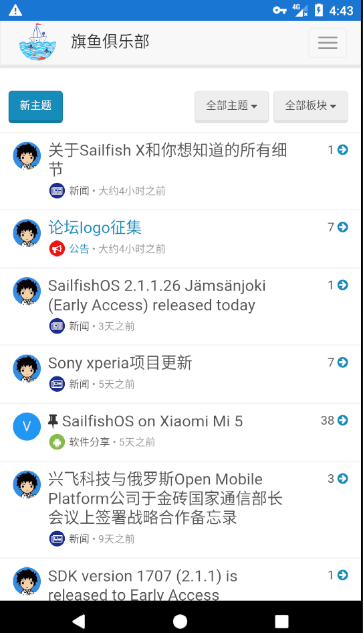
-
关于Sailfish X和你想知道的所有细节

今天我们很高兴地宣布Sailfish X的所有细节,也就是索尼Xperia X的Sailfish操作系统! 我们正在接近销售开始,现在只有几个星期了。 我们现在已经计划了所有细节,我们想与所有的Sailfish OS粉丝和追随者分享。
Sailfish X软件成熟度
简单地说:很棒,效果很好! 索尼Xperia X是运行Sailfish操作系统的绝佳设备,我们迫不及待地听到您的反馈。 让我给你一个快速预览:
https://v.qq.com/x/page/x0542kov673.html
我们的团队努力工作,以获得所有的细节。从视频可以看出,大多数功能和功能都能很好地顺利地运行。移动数据和摄像头运行良好,Android应用程序支持到位等。然而,由于它是一个长期的开发项目,仍然有一些功能将不会在第一个软件版本中正式支持。这些功能中的一些功能已经包含在该软件中,但您可以期待问题和beta级体验。第一个版本不支持的功能有:蓝牙,新传感器(例如气压计,步数计数器),指纹和FM收音机。此外,我们的目标是提供一个尽可能简单的安装工具,但是一开始您确实需要一个Linux PC,并且熟悉命令行工具来在Xperia设备上安装Sailfish操作系统。
社区当然欢迎对缺少的功能做出贡献!我们将在下周为Xperia X设备打开硬件适配源代码存储库,我们将提供有关社区如何从源代码构建自己的Sailfish镜像的说明。
9月份准备好吧!
这是您需要知道的艰难事实:
销售开始日期:2017年9月27日
产品 - 你会得到什么:- Sailfish操作系统映像闪存到您的Xperia设备 - 我们的目标是在10月11日之前准备可下载的映像
- Android支持,预测性文本输入和MS交换支持,从Jolla Store下载到您的设备
- SW更新一年,之后继续计划
- 明确说明并支持下载和安装
- Jolla客户服务中心
可用性:欧盟,挪威,瑞士; 美国和加州被确认
价格:49,90€(含增值税)
您将需要自己购买Sony Xperia X(单SIM版)。 注意:不要购买载体锁定设备,因为这些设备可能无法正常工作。
以下是购买设备的一些网站:
芬兰: Verkkokauppa.com
瑞典: Netonnet
挪威: Netonnet
丹麦: elgiganten.dk
德国: Mediamarkt.de
法国: Amazon.fr
瑞士: Mediamarkt.ch
英国: very.co.uk
中国: 并木有请记住,为了使软件在Sony Xperia X设备上正常运行,您将需要在设备上自己做一些魔法(笑~),即您应该是技术精湛的,并拥有一台带有Linux操作系统的PC来完成此过程。 不用担心,我们会为此提供良好的指示。
对于Sailfish社区设备计划的所有先驱者,由于您的持续支持和激情,我们也希望为购买Sailfish X提供折扣。 有关这方面的更多信息将尽快进行。
注册我们的电子邮件列表,并在Together.Jolla.com讨论
请在这里注册我们的Sailfish X邮件列表,我们将会为您提供有关所有内容的更新。 更接近于销售开始,我们将通知您有关更多详细信息,以及为软件安装过程提供一些说明材料。 对于平板电脑退款计划中的那些人:将有一种方式利用平板电脑退款作为Sailfish X的付款。我们将在更接近销售开始日更新,敬请关注!
我们有Sailfish X的Together.Jolla.com线索,并希望在那里看到热烈的讨论。 当然,欢迎您在博客上发表评论。
当你得到它时,我相信你会对Sailfish X感到兴奋!
您的Sailfish X计划经理,
Vesku -
SailfishOS 2.1.1.26 Jämsänjoki (Early Access) released today
SailfishOS 2.1.1.26 Jämsänjoki (Early Access) released today. The rest of the users should hold on for a week more reviewjolla.blogspot.com/p/upcoming.html

 ,不理想,始终出不来旗鱼